



Theme
Language

Layout
Skip to content
View in the app

A better way to browse. Learn more.

ZeiGames

A full-screen app on your home screen with push notifications, badges and more.

To install this app on iOS and iPadOS
  1. Tap the Share icon in Safari
  2. Scroll the menu and tap Add to Home Screen.
  3. Tap Add in the top-right corner.
To install this app on Android
  1. Tap the 3-dot menu (โ‹ฎ) in the top-right corner of the browser.
  2. Tap Add to Home screen or Install app.
  3. Confirm by tapping Install.

No Straight Roads: Encore Edition Free Download (v1.1.5)
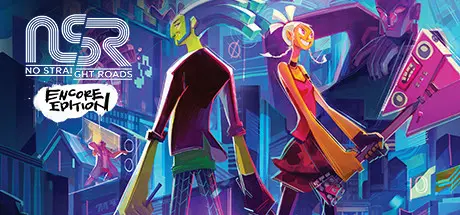
No Straight Roads: Encore Edition

Featured Replies

No Straight Roads: Encore Edition cover art

No Straight Roads: Encore Edition Game Details

Release Name:ย No Straight Roads: Encore Edition

Game Version:ย v1.1.5 | Build 7841070

Release Date: 21 Oct, 2021

Publisher: Fireshine Games

Developer: Metronomik

Based On:ย CSF & Goldberg

No Straight Roads: Encore Edition Direct Download - Game Overview

Explore Vinyl City & fight musical megastars on your journey to defeat oppressive EDM empire โ€˜NSRโ€™, in an action-packed adventure that mashes together rhythm-infused third-person combat with a kick-ass soundtrack!

No Straight Roads: Encore Edition is an enhanced version of the original music action-adventure that features the rock-tastic base game and festive-focused โ€˜Christmas Editionโ€™ update, plus brand new content, including an expanded collection of tracks, a new opening cinematic, quality of life improvements and over 500 pieces of fan art available to view and collect throughout Vinyl City.

Discover the world of Vinyl City, meet larger-than-life characters and lead a musical revolution to end the EDM empire.

Defeat musical megastars from a range of genres, including a pop-tastic boy band, a globe-spinning DJ, a child prodigy pianist and more on your journey to bring back rock.

Experience an awesome dynamic soundtrack from a line-up of musical talent, including Falk Au Yeong, Andy Tunstall, Funk Fiction, Masahiro โ€œGodspeedโ€ Aoki, Az Samad, Clyde Rabatel and the Video Game Orchestra.

Experience brand new content, including an expanded collection of tracks, a new opening cinematic, quality of life improvements and over 500 pieces of fan art available to view and collect throughout Vinyl City.


No Straight Roads: Encore Edition Screenshots

No Straight Roads: Encore Edition screenshot 1 No Straight Roads: Encore Edition screenshot 2 No Straight Roads: Encore Edition screenshot 3 No Straight Roads: Encore Edition screenshot 4


No Straight Roads: Encore Edition Trailer


No Straight Roads: Encore Edition System Requirements

Minimum Requirements

Recommended Requirements

OS

Windows 7

Windows 10 (with latest service pack)

Processor

Intel i5-3570 or AMD FX-8350

Intel i7-4770 or AMD Ryzenโ„ข 5 2600

Memory

6 GB RAM

16 GB RAM

Graphics

NVIDIA GeForce GTX 680 2GB / AMD Radeonโ„ข HD 7970

NVIDIA GeForce GTX 1060 6GB / AMD Radeonโ„ข RX 590

DirectX

-

-

Storage

25 GB available space

25 GB available space


How to Install No Straight Roads: Encore Edition

  1. No Installation Needed: The game is pre-installed. Just download and extract.

  2. Extract: Right-click the .zip or .rar file and select "Extract Here" or "Extract to folder".

  3. Run: Find NoStraightRoads.exe inside the folder and run it.

Game Data & Settings

  • Change Language: Edit the file located at steam_settings/Configs.user.ini

  • Save Data Location: %USERPROFILE%/AppData/Local/NoStraightRoads/Saved/SaveGames

Important Notes

๐Ÿ”ฅDOWNLOAD AREA๐Ÿ”ฅ

๐Ÿ”น10.54 GB๐Ÿ”น

Select the server you want to download with ZeiLink.

Download

  • Views 104
  • Created
  • Last Reply

Posted Images

Create an account or sign in to comment

Recently Browsing 0

  • No registered users viewing this page.

Account

Navigation

Search

Search

๐Ÿ”Ž Search Tip
For exact results, search using "game name" .
Without quotes, results may include unrelated titles.

Configure browser push notifications

Chrome (Android)
  1. Tap the lock icon next to the address bar.
  2. Tap Permissions โ†’ Notifications.
  3. Adjust your preference.
Chrome (Desktop)
  1. Click the padlock icon in the address bar.
  2. Select Site settings.
  3. Find Notifications and adjust your preference.
