



Theme
Language

Layout
Skip to content
View in the app

A better way to browse. Learn more.

ZeiGames

A full-screen app on your home screen with push notifications, badges and more.

To install this app on iOS and iPadOS
  1. Tap the Share icon in Safari
  2. Scroll the menu and tap Add to Home Screen.
  3. Tap Add in the top-right corner.
To install this app on Android
  1. Tap the 3-dot menu (โ‹ฎ) in the top-right corner of the browser.
  2. Tap Add to Home screen or Install app.
  3. Confirm by tapping Install.

Co-op Kaiju Horror Cooking Free Download (Build 21210715 + Online)
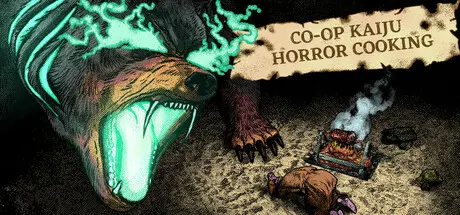
Co-op Kaiju Horror Cooking

Featured Replies

Co-op Kaiju Horror Cooking cover art

Co-op Kaiju Horror Cooking Game Details

Release Name:ย Co-op Kaiju Horror Cooking

Game Version:ย Build 21210715

Release Date: 29 Jul, 2025

Publisher: Strange Scaffold, Frosty Pop

Developer: Strange Scaffold

Based On:ย CSF & Unsteam

Co-op Kaiju Horror Cooking Direct Download - Game Overview


Co-Op Kaiju Horror Cooking is exactly what the name suggests.

You and your friends are medieval monks, chefs--and walking liabilities.

In this absurdist online multiplayer horror game, 2-4 of your favorite people (or more, if you want to risk your computers/sanity) must use traps, proximity voice chat, and Gregorian chanting among other tools to feed giant monsters known as 'kaiju', gather treasure, and prevent the apocalypse.

You have 10 minutes.

Don't stay in the Larder.

Don't get caught.

Flexible tag-based cooking system. Chop ingredients, salt them, burn them--and then fire them into a kaiju's jaws!

A story about grappling with your faith as your leaders begin to die off, leaving you to carry the torch, told across 13 levels.

The first-ever multiplayer project from the developers behind Clickolding and I Am Your Beast.

Dramatic medieval soundtrack by award-winning composer David Mason (Dredge, Creepy Redneck Dinosaur Mansion 3).

Run away from monstrous creatures--and when necessary, turn them into food.


Co-op Kaiju Horror Cooking Screenshots

Co-op Kaiju Horror Cooking screenshot 1 Co-op Kaiju Horror Cooking screenshot 2 Co-op Kaiju Horror Cooking screenshot 3 Co-op Kaiju Horror Cooking screenshot 4


Co-op Kaiju Horror Cooking Trailer


Co-op Kaiju Horror Cooking System Requirements

Minimum Requirements

Recommended Requirements

OS

Windows 10 64-bit version 1909 revision .1350 or higher, or versions 2004 and 20H2 revision .789 or higher.

-

Processor

Quad-core Intel or AMD, 2.5 GHz or faster

-

Memory

2 GB RAM

-

Graphics

8 GB or more

-

DirectX

-

-

Storage

-

-


How to Install Co-op Kaiju Horror Cooking

  1. No Installation Needed: The game is pre-installed. Just download and extract.

  2. Extract: Right-click the .zip or .rar file and select "Extract Here" or "Extract to folder".

  3. Run: Sign in Steam Account and Find ApocaCous.exe inside the folder and run it.

Game Data & Settings

  • Change Language: Edit the file located at unsteam.ini

  • Save Data Location: %USERPROFILE%/AppData/Local/ApocaCous\Saved\SaveGames

Important Notes

๐Ÿ”ฅDOWNLOAD AREA๐Ÿ”ฅ

๐Ÿ”น528 MB๐Ÿ”น

Select the server you want to download with ZeiLink.

Download

  • Views 435
  • Created
  • Last Reply

Posted Images

Create an account or sign in to comment

Recently Browsing 0

  • No registered users viewing this page.

Account

Navigation

Search

Search

๐Ÿ”Ž Search Tip
For exact results, search using "game name" .
Without quotes, results may include unrelated titles.

Configure browser push notifications

Chrome (Android)
  1. Tap the lock icon next to the address bar.
  2. Tap Permissions โ†’ Notifications.
  3. Adjust your preference.
Chrome (Desktop)
  1. Click the padlock icon in the address bar.
  2. Select Site settings.
  3. Find Notifications and adjust your preference.
