



Theme
Language

Layout
Skip to content
View in the app

A better way to browse. Learn more.

ZeiGames

A full-screen app on your home screen with push notifications, badges and more.

To install this app on iOS and iPadOS
  1. Tap the Share icon in Safari
  2. Scroll the menu and tap Add to Home Screen.
  3. Tap Add in the top-right corner.
To install this app on Android
  1. Tap the 3-dot menu (โ‹ฎ) in the top-right corner of the browser.
  2. Tap Add to Home screen or Install app.
  3. Confirm by tapping Install.

Last Pirates: Die Together Free Download (v0.4.2 + Online)
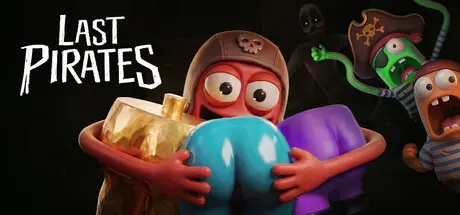
Last Pirates: Die Together

Featured Replies

Last Pirates: Die Together cover art

Last Pirates: Die Together Game Details

Release Name:ย Last Pirates: Die Together

Game Version:ย v0.4.2 | Build 24801364

Release Date: 18 Aug, 2026

Publisher: RetroStyle Games, Judatone Studios, Elegoose Games

Developer: RetroStyle Games

Based On:ย CSF & Goldberg

Last Pirates: Die Together Direct Download - Game Overview

Last Pirates: Die Together is an online co-op horror experience filled with chaos, monsters, and LOTS OF BOOTY! You and your crew will use your unusually stretchy arms to gather as much loot as you can for your captain. Be mindful of your surroundings though. There are others who mean to keep the treasure for themselves.

You land lubbers arenโ€™t that tough! You and up to three of your closest mates will work together, communicate, and survive as you try to make your olโ€™ captain rich and happy!

You are quite an unusual sailor! I bet you can grab just about anything with those pairs of hands. Dismantle doors, grab furniture, or destroy the island for all I care! Just bring that money back aboard or the captain will have our head!

Remember, scallywags, you are here for gold! Collect all the booties (and protect your own!), shake things down, and donโ€™t come out empty-handed or no-legged. Feel the adventurous drive push you deeper into the mysterious island, but make sure that at least one of you lives to carry out the gold.

Make it back to the ship in one piece, would ya? Avoid all the dangers that the island has in store for you. Play the hero or hide somewhere if you find yourself in a pickle. Or maybe one of your crewmembers can provide a distractionโ€ฆ Iโ€™m sure theyโ€™ll be fine, trust us!

Donโ€™t be afraid to look at Davey Jonesโ€™ Locker. We all die anyway, so why not create an adventure worth remembering? Grab your crew, grab some booty, and make a story worth telling those bilge rats outside!


Last Pirates: Die Together Screenshots

Last Pirates: Die Together screenshot 1 Last Pirates: Die Together screenshot 2 Last Pirates: Die Together screenshot 3 Last Pirates: Die Together screenshot 4


Last Pirates: Die Together Trailer


Last Pirates: Die Together System Requirements

Minimum Requirements

Recommended Requirements

OS

Windows 7 or later

-

Processor

Intel Core i5 or equvalent

-

Memory

8 GB RAM

-

Graphics

Nvidia GeForce GTX 1050 or equvalent

-

DirectX

-

-

Storage

5 GB available space

-


How to Install Last Pirates: Die Together

  1. No Installation Needed: The game is pre-installed. Just download and extract.

  2. Extract: Right-click the .zip or .rar file and select "Extract Here" or "Extract to folder".

  3. Run: Find Last Pirates Die Together.exe inside the folder and run it.

Multiplayer & Online (Optional)

  • Play Online: Download the Online Fix file and apply it to the game folder.

  • Please go to the online fix page and read the guide.

Game Data & Settings

  • Change Language: Edit the file located at steam_settings/Configs.user.ini

  • Save Data Location: %USERPROFILE%/AppData/LocalLow/RetroStyleGames/Last Pirates Die Together/GameSaves

Important Notes

๐Ÿ”ฅDOWNLOAD AREA๐Ÿ”ฅ

๐Ÿ”น3.49 GB๐Ÿ”น

Select the server you want to download with ZeiLink.

Download

Online Fix - (RAR pass: zeigames.com)

  • Views 614
  • Created
  • Last Reply

Posted Images

Create an account or sign in to comment

Recently Browsing 0

  • No registered users viewing this page.

Account

Navigation

Search

Search

๐Ÿ”Ž Search Tip
For exact results, search using "game name" .
Without quotes, results may include unrelated titles.

Configure browser push notifications

Chrome (Android)
  1. Tap the lock icon next to the address bar.
  2. Tap Permissions โ†’ Notifications.
  3. Adjust your preference.
Chrome (Desktop)
  1. Click the padlock icon in the address bar.
  2. Select Site settings.
  3. Find Notifications and adjust your preference.
