



Theme
Language

Layout
Skip to content
View in the app

A better way to browse. Learn more.

ZeiGames

A full-screen app on your home screen with push notifications, badges and more.

To install this app on iOS and iPadOS
  1. Tap the Share icon in Safari
  2. Scroll the menu and tap Add to Home Screen.
  3. Tap Add in the top-right corner.
To install this app on Android
  1. Tap the 3-dot menu (โ‹ฎ) in the top-right corner of the browser.
  2. Tap Add to Home screen or Install app.
  3. Confirm by tapping Install.

FIRE STATE Free Download (Build 24690239 + Online)
FIRE STATE

Featured Replies

FIRE STATE cover art

FIRE STATE Game Details

Release Name:ย FIRE STATE

Game Version:ย Build 24690239

Release Date: 7 Aug, 2026

Publisher: UnderFire

Developer: UnderFire

Based On:ย CSF & Unsteam

FIRE STATE Direct Download - Game Overview

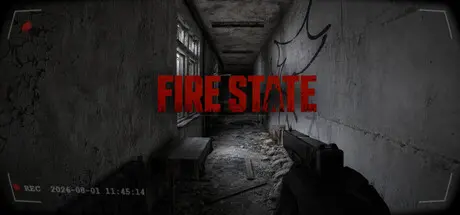
FIRE STATE is a tactical shooter played from a realistic bodycam-style perspective. We aim to strike a careful balance between intense realism and fluid playability, delivering an adrenaline-charged battlefield experience while ensuring that every action feels precise and responsive. Prepare to enter dangerous operational zones, where your body camera will capture every critical moment.

Experience tense, high-intensity confrontations through a deeply immersive first-person body camera perspective. We know that pure realism can sometimes come at the cost of accessible controls. That is why, alongside carefully crafting visual fidelity, physical feedback, and environmental audio, our development team has devoted substantial effort to optimizing the controls and player interface. The result delivers the impact of a realistic battlefield while letting you carry out every tactical intention smoothly and confidently.

FIRE STATE does more than recreate and refine the traditional shooter experience. Its competitive modes are built for players who value marksmanship, tactical judgment, and intense head-to-head action.

  • The world's first FPS game rendered with 3DGS: Through our efforts, 3DGS is no longer just a technical demo video on the internetโ€”it has truly made its way into a game. In our game, you will experience world-leading real-time 3DGS rendering technology. If you want to experience this technology, your search ends here.

  • Highly immersive realistic bodycam-style perspective: Presented through distinctive recorder footage, camera movement and a restricted field of view create authentic pressure and unprecedented tactical depth.

  • Top-tier visuals: Drawing on extensive technical experience and deep optimization for Unreal Engine 5, we deliver industry-leading visual quality. An RTX 3060-class graphics card can maintain smooth performance at maximum graphics settings.

  • A refined balance of realism and playability: Realistic elements such as environmental interaction, ballistic trajectories, and powerful audio are paired with carefully tuned controls, creating a smooth and intuitive experience where hardcore simulation and satisfying gunplay are no longer mutually exclusive.

  • Classic competitive modes: Take on time-tested traditional PVP modes, including Team Deathmatch, Zone Control, and Demolition, and use your marksmanship and tactical judgment to outplay your opponents.

Whether you are a tactical expert seeking an authentic battlefield or a competitive player ready to test your skills against other players, FIRE STATE delivers a one-of-a-kind experience worth recording. Are you ready to switch on your camera and define your own battlefield legend?

โ€œFIRE STATEโ€ is independently developed and published by UNDER FIRE. This game is not affiliated with, authorized by, sponsored by, endorsed by, or associated with any third-party game studio, publisher, or trademark owner.


FIRE STATE Screenshots

FIRE STATE screenshot 1 FIRE STATE screenshot 2 FIRE STATE screenshot 3 FIRE STATE screenshot 4


FIRE STATE Trailer


FIRE STATE System Requirements

Minimum Requirements

Recommended Requirements

OS

-

windows10

Processor

-

Intel Core i7-7700

Memory

8 GB RAM

16 GB RAM

Graphics

-

RTX 3060

DirectX

-

-

Storage

10 GB available space

10 GB available space


How to Install FIRE STATE

  1. No Installation Needed: The game is pre-installed. Just download and extract.

  2. Extract: Right-click the .zip or .rar file and select "Extract Here" or "Extract to folder".

  3. Run: Sign in Steam Account and Find FIRESTATE.exe inside the folder and run it.

Multiplayer & Online (Optional)

  • Play Online: Download the Online Fix file and apply it to the game folder.

  • Please go to the online fix page and read the guide.

Game Data & Settings

  • Change Language: Edit the file located at unsteam.ini

  • Save Data Location: %USERPROFILE%/AppData/Local/FIRESTATE

Important Notes

๐Ÿ”ฅDOWNLOAD AREA๐Ÿ”ฅ

๐Ÿ”น26.63 GB๐Ÿ”น

Select the server you want to download with ZeiLink.

Download

  • Views 1k
  • Created
  • Last Reply

Posted Images

Create an account or sign in to comment

Recently Browsing 0

  • No registered users viewing this page.

Account

Navigation

Search

Search

๐Ÿ”Ž Search Tip
For exact results, search using "game name" .
Without quotes, results may include unrelated titles.

Configure browser push notifications

Chrome (Android)
  1. Tap the lock icon next to the address bar.
  2. Tap Permissions โ†’ Notifications.
  3. Adjust your preference.
Chrome (Desktop)
  1. Click the padlock icon in the address bar.
  2. Select Site settings.
  3. Find Notifications and adjust your preference.
