



Theme
Language

Layout
Skip to content
View in the app

A better way to browse. Learn more.

ZeiGames

A full-screen app on your home screen with push notifications, badges and more.

To install this app on iOS and iPadOS
  1. Tap the Share icon in Safari
  2. Scroll the menu and tap Add to Home Screen.
  3. Tap Add in the top-right corner.
To install this app on Android
  1. Tap the 3-dot menu (⋮) in the top-right corner of the browser.
  2. Tap Add to Home screen or Install app.
  3. Confirm by tapping Install.

MARVEL Tokon: Fighting Souls Free Download (Build 24832302 + Online)
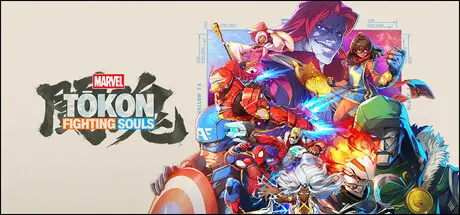
MARVEL Tokon: Fighting Souls

Featured Replies

MARVEL Tōkon: Fighting Souls cover art

MARVEL Tōkon: Fighting Souls Game Details

Release Name: MARVEL Tōkon: Fighting Souls

Game Version: Build 24832302

Release Date: 6 Aug, 2026

Publisher: PlayStation Publishing LLC

Developer: ARC SYSTEM WORKS CO., LTD

Based On: CSF / OFME

MARVEL Tōkon: Fighting Souls Direct Download - Game Overview

Assemble your team of legendary Marvel characters in the ultimate 4v4 tag team fighter from PlayStation Studios, Arc System Works and Marvel Games.

It’s time to build your dream team and break some spirits in blistering 4v4 fighting action. Choose from an expanding roster of 20 iconic Marvel characters at launch, each rendered in a bold new anime-inspired art style and members of their own unique teams of equally impressive heroes and villains.

Experiment with team compositions to discover new combos, synergies, and strategies. Blast your way through dynamic stages based on iconic Marvel Universe locales, some featuring interactive stage transitions.

Fighting is both immersive and intuitive, with a range of unique move sets, combos, and strategies to master. Adjustable controls, both traditional and quick inputs, plus easy chain combos make diving right in a breeze.

Face off against a friend locally or join the fray with up to 64 players in the online² lobby, including standard VS modes. Plus, dive deep on each team with the single player Episode Mode to learn more about team dynamics and lore.

²Internet connection and account for PlayStation required.

MARVEL Tōkon: Fighting Souls features a wide range of offline content, including Episode Mode, local Versus, Training Mode, All-Star Arena, Character Guides and more.

The mode Arcadia Rumble is also fully playable offline, with optional online features.

A PlayStation Account and internet connection are required for Online Lobby, Room Matches (Private Rooms), Ranked Matches, Casual Matches, Player Profile and other online features.


MARVEL Tōkon: Fighting Souls Screenshots

MARVEL Tōkon: Fighting Souls screenshot 1 MARVEL Tōkon: Fighting Souls screenshot 2 MARVEL Tōkon: Fighting Souls screenshot 3 MARVEL Tōkon: Fighting Souls screenshot 4


MARVEL Tōkon: Fighting Souls Trailer


MARVEL Tōkon: Fighting Souls System Requirements

Minimum Requirements

Recommended Requirements

OS

Windows 11

Windows 11

Processor

Intel Core i5-8400 or AMD Ryzen 5 1600X

Intel Core i7-8700 or AMD Ryzen 5 3600X

Memory

16 GB RAM

16 GB RAM

Graphics

NVIDIA GeForce RTX 2060 6GB or AMD Radeon RX 6600 XT 8GB

NVIDIA GeForce RTX 3070 8 GB or AMD Radeon RX 7600 XT 16 GB

DirectX

-

-

Storage

27 GB available space

27 GB available space


How to Install MARVEL Tōkon: Fighting Souls

  1. No Installation Needed: The game is pre-installed. Just download and extract.

  2. Extract: Right-click the .zip or .rar file and select "Extract Here" or "Extract to folder".

  3. Run: Open Steam Account and Find start_protected_game.exe inside the folder and run it.

  4. If game not open, need to install this redist \MTFS\MTFS\Binaries\Win64\Prerequisites.

  5. If Controller not work, add the start_protected_game.exe file to steam, and edit controller config on steam.

How to Play online?

  1. No Installation Needed: The game is pre-installed. Just download and extract.

  2. Extract: Right-click the .zip or .rar file and select "Extract Here" or "Extract to folder".

  3. Run: Open Steam Account and Find EGSAuthLauncher.exe inside the folder and run it.

Game Data & Settings

  • Save Data Location: %USERPROFILE%/AppData/Local/MTFSSteam/Saved/SAVE/

Important Notes

🔥DOWNLOAD AREA🔥

🔹25.36 GB🔹

Select the server you want to download with ZeiLink.

Download

Online Version - (v1.2.2 - 25.41 GB)

Download

  • Replies 4
  • Views 1.7k
  • Created
  • Last Reply

Top Posters In This Topic

Posted Images

I tried to get this earlier but running into the same problem, easy anti cheat not detected and then instant crash, any way to fix it?


i got it working, D:\tokon\MTFS\Binaries\Win64\Prerequisites go through here and run the batch files, its a bit sketch with run commands but the game will launch. hopefully theres an online fix one day. D: is just where i have it installed prob will be different for someone else

  • DicDale changed the title to MARVEL Tokon: Fighting Souls Free Download (Build 24832302 + Online)

Create an account or sign in to comment

Recently Browsing 0

  • No registered users viewing this page.

Account

Navigation

Search

Search

🔎 Search Tip
For exact results, search using "game name" .
Without quotes, results may include unrelated titles.

Configure browser push notifications

Chrome (Android)
  1. Tap the lock icon next to the address bar.
  2. Tap Permissions → Notifications.
  3. Adjust your preference.
Chrome (Desktop)
  1. Click the padlock icon in the address bar.
  2. Select Site settings.
  3. Find Notifications and adjust your preference.