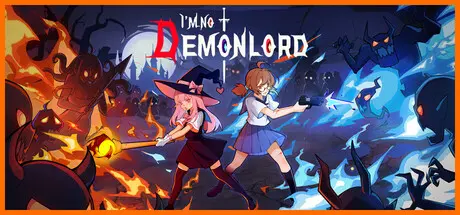
August 9Aug 9 I'm No Demonlord Game DetailsRelease Name: I'm No DemonlordGame Version: v1.0.3 | Build 24640628Release Date: 5 Aug, 2026Publisher: EdiggerDeveloper: NiaoWu StudioBased On: CSF & GoldbergI'm No Demonlord Direct Download - Game OverviewOnce upon a time, a legendary archmage sacrificed himself to cast a magical seal on a supervillain, allowing the kingdom to prosper. But when the king began arresting commoners without reason, the vanished people were never seen again. One day, the seal weakened, the demon king escaped, and possessed the player's adventurer character. Can he accept his new identity? Uncover the king's plot? Save "kinds" or destroy "outsiders"? Good or evil? It's your choice...Round up your friends for an adventure! The game currently supports both remote play and local co-op for two players. So, grab your buddy and join the adventure together! The mysterious plot awaits your discovery!Over 1000 construction mechanics, endless combinations. Say no to pure numerical growth experiences!Players freely combine factions, with mechanisms interacting to create wondrous chemical reactions, ensuring no two playthroughs are the same!Players can freely choose route branches based on their own needs!Treasure rooms, challenge rooms, and rare abilities await your discovery, making your build even more powerful!I'm No Demonlord Screenshots I'm No Demonlord TrailerI'm No Demonlord System Requirements Minimum RequirementsRecommended Requirements OSWindows 10 or laterWindows 10 or later ProcessorIntel Core i3-3240 (2 * 3400); AMD FX-4300 (4 * 3800)Intel Core i5-3470 Memory16 GB RAM32 GB RAM GraphicsGeForce GTX 560 Ti (1024 VRAM); Radeon HD 7750 (1024 VRAM)GeForce GTX 1050 (2048 VRAM); Radeon R9 380 (2048 VRAM) DirectXVersion 10Version 10 Storage1 GB available space2 GB available space How to Install I'm No DemonlordNo Installation Needed: The game is pre-installed. Just download and extract.Extract: Right-click the .zip or .rar file and select "Extract Here" or "Extract to folder".Run: Find ImNoDemonlord.exe inside the folder and run it.Game Data & SettingsChange Language: Edit the file located at steam_settings/Configs.user.iniSave Data Location: */dataImportant NotesTo support the Game Developer, Get It On Steam.🔥DOWNLOAD AREA🔥🔹263 MB🔹Select the server you want to download with ZeiLink.Download





Create an account or sign in to comment