



Theme
Language

Layout
Skip to content
View in the app

A better way to browse. Learn more.

ZeiGames

A full-screen app on your home screen with push notifications, badges and more.

To install this app on iOS and iPadOS
  1. Tap the Share icon in Safari
  2. Scroll the menu and tap Add to Home Screen.
  3. Tap Add in the top-right corner.
To install this app on Android
  1. Tap the 3-dot menu (โ‹ฎ) in the top-right corner of the browser.
  2. Tap Add to Home screen or Install app.
  3. Confirm by tapping Install.

Forza Horizon 3 Free Download (v1.0.125.2 + ALL DLC)
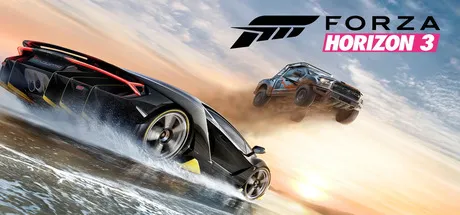
Forza Horizon 3

Featured Replies

Forza Horizon 3 cover art

Forza Horizon 3 Game Details

Release Name:ย Forza Horizon 3

Game Version:ย v1.0.125.2

Release Date: 27 Sep, 2016

Publisher: Microsoft Studios

Developer: Playground Games

Based On:ย OFME

Forza Horizon 3 Direct Download - Game Overview

Forza Horizon 3 is an open-world racing game set in a fictionalized version of Australia. Unlike previous entries, you become the director of the Horizon Festival, allowing you to create and expand events, recruit drivers, and customize the festival while exploring diverse environments such as beaches, deserts, rainforests, cities, and the Outback. The game features over 350 licensed vehicles at launch, dynamic weather, online multiplayer, and supports Xbox Play Anywhere between Xbox One and Windows 10.


Forza Horizon 3 Screenshots

Forza Horizon 3 screenshot 1 Forza Horizon 3 screenshot 2 Forza Horizon 3 screenshot 3 Forza Horizon 3 screenshot 4


Forza Horizon 3 Trailer


Forza Horizon 3 System Requirements

Minimum Requirements

Recommended Requirements

OS

Windows 10 Anniversary Update (64-bit)

Windows 10 Anniversary Update (64-bit)

Processor

Intel Core i5-3570 @ 3.4 GHz or AMD FX-6300

Intel Core i7-3820 @ 3.6 GHz

Memory

8 GB RAM

12 GB RAM

Graphics

NVIDIA GeForce GTX 750 Ti or AMD Radeon R7 250X

NVIDIA GeForce GTX 970 / GTX 1060 or AMD Radeon R9 290X / RX 480

DirectX

Version 12

Version 12

Storage

55 GB available space

55 GB available space


How to Install Forza Horizon 3

  1. Check the system requirements.

    Minimum Requirements:

    • Windows 10 64-bit (Version 1909 or later)

    • Microsoft Store installed

    • Xbox app installed

    • Xbox Gaming Services installed

  2. Run UWP_Helper.bat located in the game folder. (Required only once.)

  3. Enable Developer Mode by selecting "Enable Developer Mode" in the helper. If prompted, restart your PC. (Required only once.)

    Note: Before enabling Developer Mode, it is recommended that you familiarize yourself with what it does and how it works.

  4. Install the game by selecting "Install Game" in the helper. (Required only once.)

  5. Install the DLC by selecting "Install DLC". (Required only once.)

  6. Disable Developer Mode by selecting "Disable Developer Mode". (Required only once.)

  7. Launch the game from the Start Menu.

Important Information

The original purpose of this fix was to restore the game's online functionality. Unfortunately, Microsoft quietly shut down the Forza Horizon 3 online servers in October 2021, making multiplayer modes unavailable. However, several online-connected features, such as Drivatars, Forzathon, and other in-game services, are still functional.

Despite the lack of multiplayer support, this release is the result of extensive work to make the game playable on modern systems. This guide focuses on installing and running the game successfully without multiplayer functionality.


Troubleshooting

If the game crashes during startup or gameplay, try the following solutions:

  1. Disable any software that injects or hooks into the game.

    • Examples include overlays from MSI Afterburner/RivaTuner, Discord, GeForce Experience, Steam Overlay, Xbox Game Bar, Overwolf, or similar applications.

    • The game may detect these programs and crash as a result.

  2. Disable the microphone in the game's settings.

    • In some cases, turning off microphone access resolves startup or stability issues.

If neither of these issues applies, the game should run normally. The fix has been tested successfully on multiple different systems.

DLC List

Added DLCs

  1. Alpinestars Car Pack

  2. Blizzard Mountain Expansion

  3. Bonus Car Pack

  4. Chevrolet Bel Air (July Car Pack)

  5. Duracell Car Pack

  6. Duracell GTA Spano

  7. Forza Horizon 3 Car Pass

  8. Forza Horizon 3 Expansion Pass

  9. Hot Wheels Expansion

  10. Horn Unlock Accelerator

  11. June Car Pack (Mountain Dew Car Pack)

  12. Logitech G Car Pack

  13. Motorsport All-Stars Pack

  14. Porsche Car Pack

  15. Rockstar Energy Car Pack

  16. The Smoking Tire Car Pack

  17. Treasure Map

  18. VIP Membership

๐Ÿ”ฅDOWNLOAD AREA๐Ÿ”ฅ

๐Ÿ”น61.48 GB๐Ÿ”น

Select the server you want to download with ZeiLink.

Download

  • Replies 6
  • Views 930
  • Created
  • Last Reply

Top Posters In This Topic

Posted Images

I can't find a file named UWP_Helper.bat in the game folder. Please help me.

i checked my window defender and i dont saw files deleted i don't have any other application but i reinstall teh app and i check tomorrow

Add-AppxPackage : ร‰chec du dรฉploiement avec HRESULTย : 0x80073CF6, Impossible dโ€™inscrire le package. AppxManifest.xml(81,27): erreur 0x80070002: impossible dโ€™installer ou de mettre ร  jour le package Microsoft.OpusPG_8wekyb3d8bbwe, car lโ€™image de lโ€™รฉcran de dรฉmarrage [Wide620x300Logo.png] est introuvable. Vรฉrifiez que le package contient bien une image pouvant servir dโ€™รฉcran de dรฉmarrage pour lโ€™application et que le manifeste du package pointe sur lโ€™emplacement dans le package oรน cette image dโ€™รฉcran de dรฉmarrage se trouve effectivement. REMARQUE: pour obtenir des informations supplรฉmentaires, recherchez [ActivityId] b4871882-231b-0002-c177-93b41b23dd01 dans le journal des รฉvรฉnements ou utilisez la ligne de commande Get-AppPackageLog -ActivityID b4871882-231b-0002-c177-93b41b23dd01 Au caractรจre Ligne:1 : 1 + Add-AppxPackage 'C:\Users\gabyt\OneDrive\Documents\Forza.Horizon.3.v1 ... + ~~~~~~~~~~~~~~~~~~~~~~~~~~~~~~~~~~~~~~~~~~~~~~~~~~~~~~~~~~~~~~~~~~~~~ + CategoryInfo : WriteError: (C:\Users\gabyt\...ppxManifest.xml:String) [Add-AppxPackage], IOException + FullyQualifiedErrorId : DeploymentError,Microsoft.Windows.Appx.PackageManager.Commands.AddAppxPackageCommand

Create an account or sign in to comment

Recently Browsing 0

  • No registered users viewing this page.

Account

Navigation

Search

Search

๐Ÿ”Ž Search Tip
For exact results, search using "game name" .
Without quotes, results may include unrelated titles.

Configure browser push notifications

Chrome (Android)
  1. Tap the lock icon next to the address bar.
  2. Tap Permissions โ†’ Notifications.
  3. Adjust your preference.
Chrome (Desktop)
  1. Click the padlock icon in the address bar.
  2. Select Site settings.
  3. Find Notifications and adjust your preference.
