



Theme
Language

Layout
Skip to content
View in the app

A better way to browse. Learn more.

ZeiGames

A full-screen app on your home screen with push notifications, badges and more.

To install this app on iOS and iPadOS
  1. Tap the Share icon in Safari
  2. Scroll the menu and tap Add to Home Screen.
  3. Tap Add in the top-right corner.
To install this app on Android
  1. Tap the 3-dot menu (โ‹ฎ) in the top-right corner of the browser.
  2. Tap Add to Home screen or Install app.
  3. Confirm by tapping Install.

Truck-kun is Supporting Me from Another World?! Free Download (v26.30.1)
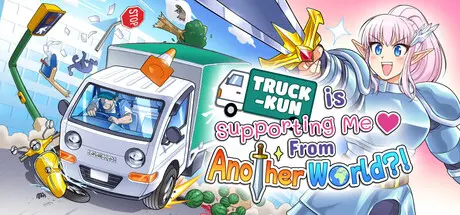
Truck-kun is Supporting Me from Another World?!

Featured Replies

Truck-kun is Supporting Me from Another World?! cover art

Truck-kun is Supporting Me from Another World?! Game Details

Release Name:ย Truck-kun is Supporting Me from Another World?!

Game Version:ย v26.30.1 | Build 24423635

Release Date: 29 Jul, 2026

Publisher: Frosty Pop, Strange Scaffold

Developer: Strange Scaffold

Based On:ย CSF & Goldberg

Truck-kun is Supporting Me from Another World?! Direct Download - Game Overview

Carissa Ward was all set to start her new job as the VP of marketing--until YOU hit her with your truck and transported her consciousness to a world of fantasy and magic! Rather than accept her fate, gathering a party and going on a journey of growth and self-discovery, Carissa uses all her knowledge of anime tropes and Japanese RPGs to find a different path:

Pressed into the service of the newly-incarnated buff anime elf, you'll speed your magic delivery truck to complete objectives across two worlds in a focused and flavorful OVA-sized campaign, running over pedestrians, sending them to another world as Truck-kun, and helping Carissa power up a Galactic Gate with the stars you generate together. The Skeleton King waits on the other end of the great divide, and the only way Carissa is getting home is to take a Scroll of Resurrection from his weird, dead, bony hands.ย 

  • Dodge cops, make deliveries, and smash through objects in the chaotic small town of Wenvale, USA!

  • Complete objectives across two worlds to power up a Galactic Gate with stars and unlock a subversive, heartwarming story rooted in our love for anime.

  • Run over pedestrians to turn them into monsters Carissa can slay for stars and XP. It's fine! Don't worry! Stop thinking about it!!

  • Energetic, ska-inspired soundtrack by award-winning composer David Mason (Dredge, Creepy Redneck Dinosaur Mansion 3).

  • A giant, screaming man whose meat you can legally drive through.


Truck-kun is Supporting Me from Another World?! Screenshots

Truck-kun is Supporting Me from Another World?! screenshot 1 Truck-kun is Supporting Me from Another World?! screenshot 2 Truck-kun is Supporting Me from Another World?! screenshot 3 Truck-kun is Supporting Me from Another World?! screenshot 4


Truck-kun is Supporting Me from Another World?! Trailer


Truck-kun is Supporting Me from Another World?! System Requirements

Minimum Requirements

Recommended Requirements

OS

Windows 10

-

Processor

@ 2GHz

-

Memory

4 GB RAM

-

Graphics

Intel HD Graphics 2000

-

DirectX

-

-

Storage

1 GB available space

-


How to Install Truck-kun is Supporting Me from Another World?!

  1. No Installation Needed: The game is pre-installed. Just download and extract.

  2. Extract: Right-click the .zip or .rar file and select "Extract Here" or "Extract to folder".

  3. Run: Find Truck-kun.exe inside the folder and run it.

Game Data & Settings

  • Change Language: Edit the file located at steam_settings/Configs.user.ini

  • Save Data Location: %USERPROFILE%/AppData/LocalLow/Strange Scaffold/Truck-kun

Important Notes

๐Ÿ”ฅDOWNLOAD AREA๐Ÿ”ฅ

๐Ÿ”น281 MB๐Ÿ”น

Select the server you want to download with ZeiLink.

Download

  • Views 695
  • Created
  • Last Reply

Posted Images

Create an account or sign in to comment

Recently Browsing 0

  • No registered users viewing this page.

Account

Navigation

Search

Search

๐Ÿ”Ž Search Tip
For exact results, search using "game name" .
Without quotes, results may include unrelated titles.

Configure browser push notifications

Chrome (Android)
  1. Tap the lock icon next to the address bar.
  2. Tap Permissions โ†’ Notifications.
  3. Adjust your preference.
Chrome (Desktop)
  1. Click the padlock icon in the address bar.
  2. Select Site settings.
  3. Find Notifications and adjust your preference.
