



Theme
Language

Layout
Skip to content
View in the app

A better way to browse. Learn more.

ZeiGames

A full-screen app on your home screen with push notifications, badges and more.

To install this app on iOS and iPadOS
  1. Tap the Share icon in Safari
  2. Scroll the menu and tap Add to Home Screen.
  3. Tap Add in the top-right corner.
To install this app on Android
  1. Tap the 3-dot menu (โ‹ฎ) in the top-right corner of the browser.
  2. Tap Add to Home screen or Install app.
  3. Confirm by tapping Install.

Tonkatsu Diner Simulator Free Download (Build 24288817)
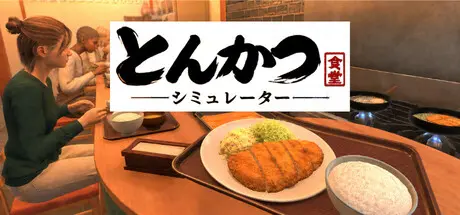
Tonkatsu Diner Simulator

Featured Replies

Tonkatsu Diner Simulator cover art

Tonkatsu Diner Simulator Game Details

Release Name:ย Tonkatsu Diner Simulator

Game Version:ย Build 24288817

Release Date: 31 May, 2026

Publisher: ARAKI

Developer: ARAKI

Based On:ย CSF & Goldberg

Tonkatsu Diner Simulator Direct Download - Game Overview

As the owner of a small diner, you will handle everything on your own, from buying ingredients and cooking to serving customers, handling payments, and washing dishes.

Start with limited funds and equipment, serve delicious tonkatsu to your customers, and gradually grow your diner.

In this game, the โ€œfrying levelโ€ of your tonkatsu affects the quality of the dish.

It is not just about cooking ingredients. You need to judge the right timing and fry each cutlet to perfection.

Serve well-fried tonkatsu, and your customersโ€™ satisfaction will increase.

Before opening, purchase the ingredients you need. During business hours, cook dishes according to each customerโ€™s order.

After serving the food, do not forget to handle payments, wash dishes, and take care of other tasks.

By working efficiently, you will be able to serve more customers.

As you continue running your diner, you can unlock new menu items and equipment.

Your diner may start small, but little by little, you will be able to do more.

Improve your cooking skills, upgrade your equipment, increase customer satisfaction, and aim to become a popular local diner.


Tonkatsu Diner Simulator Screenshots

Tonkatsu Diner Simulator screenshot 1 Tonkatsu Diner Simulator screenshot 2 Tonkatsu Diner Simulator screenshot 3 Tonkatsu Diner Simulator screenshot 4


Tonkatsu Diner Simulator System Requirements

Minimum Requirements

Recommended Requirements

OS

Windows 10 / 11 64-bit

Windows 10 / 11 64-bit

Processor

Intel Core i5-8400 or AMD Ryzen 5 2600

Intel Core i5-10400 or AMD Ryzen 5 3600

Memory

8 GB RAM

16 GB RAM

Graphics

NVIDIA GeForce GTX 1060 6GB or AMD Radeon RX 580 8GB

NVIDIA GeForce RTX 2060 or AMD Radeon RX 6600

DirectX

Version 11

Version 11

Storage

5 GB available space

5 GB available space


How to Install Tonkatsu Diner Simulator

  1. No Installation Needed: The game is pre-installed. Just download and extract.

  2. Extract: Right-click the .zip or .rar file and select "Extract Here" or "Extract to folder".

  3. Run: Find Tonkatsu Diner Simulator.exe inside the folder and run it.

Game Data & Settings

  • Change Language: Edit the file located at steam_settings/Configs.user.ini

Important Notes

๐Ÿ”ฅDOWNLOAD AREA๐Ÿ”ฅ

๐Ÿ”น1.01 GB๐Ÿ”น

Select the server you want to download with ZeiLink.

Download

  • Replies 1
  • Views 519
  • Created
  • Last Reply

Top Posters In This Topic

Posted Images

excellent pirated port for a terrible game. You saved everyone a lot of money.
You do get to cook katsu. There isn't much content or upgrades in this simulator however. And it is full of npc pathing bugs. And people sell games like these for real money!

Create an account or sign in to comment

Recently Browsing 0

  • No registered users viewing this page.

Account

Navigation

Search

Search

๐Ÿ”Ž Search Tip
For exact results, search using "game name" .
Without quotes, results may include unrelated titles.

Configure browser push notifications

Chrome (Android)
  1. Tap the lock icon next to the address bar.
  2. Tap Permissions โ†’ Notifications.
  3. Adjust your preference.
Chrome (Desktop)
  1. Click the padlock icon in the address bar.
  2. Select Site settings.
  3. Find Notifications and adjust your preference.
