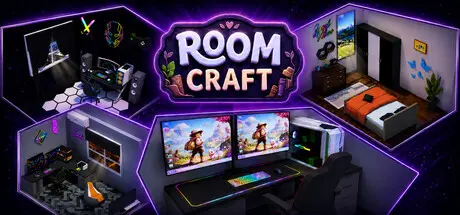
July 18Jul 18 Room Craft Game DetailsRelease Name: Room CraftGame Version: Build 24239874Release Date: 13 Jul, 2026Publisher: WM GAMESDeveloper: AltaiBased On: CSF & GoldbergRoom Craft Direct Download - Game OverviewRoom Craft is a creative simulation experience that gives players the freedom to plan, build, and decorate their own rooms. It is not just about placing furniture — you can also create the core structure of the room yourself by drawing the layout through the UI. Whether you want a cozy workspace, a modern living area, or a completely unique layout, the choice is yours.Use the planning mode to draw walls, define the shape of your room, and build your space from scratch. Design areas in different sizes and layouts, then reshape them whenever you like.Room Craft goes beyond basic room setup. You can adjust wall lengths with greater precision, use fractional wall scaling for finer measurements, and build your space with a higher level of detail. This allows you to create more natural, controlled, and unique room layouts.Position furniture and decorative objects however you like. Rearrange your setup at any time, experiment with different combinations, and organize your space exactly the way you want.Personalize walls, floors, and furniture with different colors and finishes. Experiment with different styles to create minimal, modern, warm, or eye-catching interiors.With different wall surfaces, floor options, and decorative elements, you can completely change the identity of each room. Turn a small space into a clean minimalist office or transform a larger area into a detailed living space.Create rooms by drawing the layout through the UIPlan and build rooms from scratchFractional wall scaling and precise sizingFlexible room layout creationFree furniture and decoration placementWall, floor, and furniture customizationCreate different styles and atmospheresRedesign your space anytimeRoom Craft Screenshots Room Craft TrailerRoom Craft System Requirements Minimum RequirementsRecommended Requirements OSWindows 10Windows 10 ProcessorCore i5-6500 or equivalentCore i5-6500 or equivalent Memory8000 MB RAM8000 MB RAM GraphicsNVidia 950 or equivalentNVidia 1050-Tİ DirectXVersion 11Version 11 Storage1000 MB available space1000 MB available space How to Install Room CraftNo Installation Needed: The game is pre-installed. Just download and extract.Extract: Right-click the .zip or .rar file and select "Extract Here" or "Extract to folder".Run: Find RoomCraft.exe inside the folder and run it.Game Data & SettingsChange Language: Edit the file located at steam_settings/Configs.user.iniSave Data Location: %USERPROFILE%/AppData/Local/RoomCraft/Saved/SaveGamesImportant NotesTo support the Game Developer, Get It On Steam.🔥DOWNLOAD AREA🔥🔹1.21 GB🔹Select the server you want to download with ZeiLink.Download





Create an account or sign in to comment