



Skip to content
View in the app

A better way to browse. Learn more.

ZeiGames

A full-screen app on your home screen with push notifications, badges and more.

To install this app on iOS and iPadOS
  1. Tap the Share icon in Safari
  2. Scroll the menu and tap Add to Home Screen.
  3. Tap Add in the top-right corner.
To install this app on Android
  1. Tap the 3-dot menu (โ‹ฎ) in the top-right corner of the browser.
  2. Tap Add to Home screen or Install app.
  3. Confirm by tapping Install.

The Great Villainess: Strategy of Lily Free Download (v1.2.0 + DIGITAL ARTWORKS DLC)
Featured Replies

header.webp

Game Details

Release Name:ย The Great Villainess: Strategy of Lily

Game Version:ย v1.2.0 | Build 23794676

Release Date: 23 Jul, 2025

Publisher: Alliance Arts

Developer: Alliance Arts, One or Eight, WSS Playground

Based On:ย CSF & Goldberg

The Great Villainess: Strategy of Lily Direct Download - Game Review

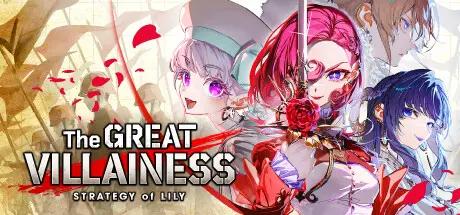
In the rigid hierarchy of the Empireโ€™s aristocracy, the free-spirited duchess Scarlet refused to conform, and was framed for Regicide, the assassination of the Emperor.

With the help of Lily, the captain of the cutting-edge Stream Airship, Scarlet escapes the imperial capital and declares war against the Empire!

As Scarletโ€™s recklessness and Lilyโ€™s cold pragmatism collide, the conflict soon engulfs the entire continent.

Capture enemy generals, turn them into allies, and clear Scarletโ€™s name as you fight for the duoโ€™s happy ending!

Victory is achieved by "capturing" or "executing" enemy generals.

Defeat comes if either Scarlet or Lily falls in battle.

Secure only the essential supply line outposts, and carve a path of invasion using your limited forces and the Stream Airship.

You can ambush, prolong sieges or a full-scale attack... Nothing is off the table.

Units stationed at outposts connected to your headquarters via โ€œlinesโ€ receive powerful support every turn. This applies to both allies and enemies.

Get cut off, and youโ€™re in danger. Cut the enemyโ€™s line, and an opportunity arises.

What matters isnโ€™t territory, but maintaining critical supply lines.

Do not get distracted by the enemy!

The enemy comes in overwhelming numbers, backed by sudden reinforcements and surprise attacks.

Scarletโ€™s army is too small to defend every front.

Abandon unnecessary outposts, do NOT hesitate, and focus your forces on a single enemy general.

Build a supply line that maximizes your power and give it all to the enemy general!


Game Screenshots

screenshot screenshot screenshot screenshot


Game Trailer


System Requirements

Minimum Requirements

Recommended Requirements

OS

Windows 10, 11 (64bit)

Windows 10, 11 (64bit)

Processor

Coreโ„ข i5-9400

-

Memory

8 GB RAM

-

Graphics

GeForceยฎ GTX 1050 Ti 4GB

-

DirectX

-

-

Storage

-

-


Installation Guide

  1. No Installation Needed: The game is pre-installed. Just download and extract.

  2. Extract: Right-click the .zip or .rar file and select "Extract Here" or "Extract to folder".

  3. Run: Find GreatVillainess.exe inside the folder and run it.

Game Data & Settings

  • Change Language: Edit the file located at steam_settings/Configs.user.ini

  • Save Data Location: %USERPROFILE%/AppData/LocalLow/AllianceArts/GreatVillainess/save/

Important Notes

DLC List

Added DLCs

The Great Villainess: Strategy of Lily - DIGITAL ARTWORKS

๐Ÿ”ฅDOWNLOAD AREA๐Ÿ”ฅ

๐Ÿ”น5.17 GB๐Ÿ”น

Select the server you want to download with ZeiLink.

Download

  • Replies 1
  • Views 685
  • Created
  • Last Reply

Top Posters In This Topic

Most Popular Posts

  • SCATTER8945
    SCATTER8945

    THANK YOU SO MUCH -Sincerely the guy who requested

Posted Images

Create an account or sign in to comment

Recently Browsing 0

  • No registered users viewing this page.

Account

Navigation

Search

Search

๐Ÿ”Ž Search Tip
For exact results, search using "game name" .
Without quotes, results may include unrelated titles.

Configure browser push notifications

Chrome (Android)
  1. Tap the lock icon next to the address bar.
  2. Tap Permissions โ†’ Notifications.
  3. Adjust your preference.
Chrome (Desktop)
  1. Click the padlock icon in the address bar.
  2. Select Site settings.
  3. Find Notifications and adjust your preference.
