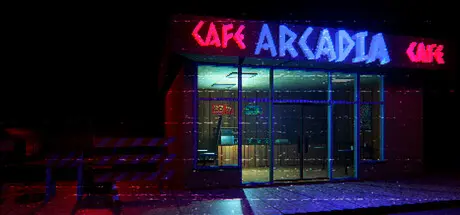
June 29Jun 29 Arcadia Cafe Game DetailsRelease Name: Arcadia CafeGame Version: v1.0.32 | Build 23413303Release Date: 30 Apr, 2026Publisher: Judas BrothersDeveloper: Judas Brothers, Rassl.meBased On: CSF & GoldbergArcadia Cafe Direct Download - Game OverviewArcadia Cafe is a domestic horror game about a college student working late shifts in the nameless city in Ukraine. During night shifts, you will meet strange, bizarre characters with their own needs. Serve well, or consequences may affect your life.Domestic Horror: Simple, mundane, routine work becomes a nightmare when you don't expect it.Night shift worker gameplay: take the role of a night shift worker in a roadside cafe and meet strange, bizarre guests with their own needs.Ukrainian Theme: Environmental art inspired by the unique culture of Ukraine in the early 2000s.VHS Aesthetic: The VHS aesthetic makes one feel like they're in the early 2000s. Interlacing and jitter in the analog video signal add extra immersion to the horror experience.Arcadia Cafe Screenshots Arcadia Cafe TrailerArcadia Cafe System Requirements Minimum RequirementsRecommended Requirements OSWindows 7 SP1, Windows 8.1 or later, Windows 10Windows 7 SP1, Windows 8.1 or later, Windows 10 ProcessorIntel i5-4590, AMD FX 8350 equivalent or betterIntel i5-4590, AMD FX 8350 equivalent or better Memory4 GB RAM6 GB RAM GraphicsNvidia GeForce GTX 970, AMD Radeon R9 290 equivalent or betterNVIDIA GeForce™ GTX 1060 or AMD Radeon™ RX 480, equivalent or better DirectX-- Storage1 GB available space1 GB available space How to Install Arcadia CafeNo Installation Needed: The game is pre-installed. Just download and extract.Extract: Right-click the .zip or .rar file and select "Extract Here" or "Extract to folder".Run: Find arcadia.exe inside the folder and run it.Game Data & SettingsChange Language: Edit the file located at steam_settings/Configs.user.iniImportant NotesTo support the Game Developer, Get It On Steam.🔥DOWNLOAD AREA🔥🔹620 MB🔹Select the server you want to download with ZeiLink.Download





Create an account or sign in to comment