



Skip to content
View in the app

A better way to browse. Learn more.

ZeiGames

A full-screen app on your home screen with push notifications, badges and more.

To install this app on iOS and iPadOS
  1. Tap the Share icon in Safari
  2. Scroll the menu and tap Add to Home Screen.
  3. Tap Add in the top-right corner.
To install this app on Android
  1. Tap the 3-dot menu (โ‹ฎ) in the top-right corner of the browser.
  2. Tap Add to Home screen or Install app.
  3. Confirm by tapping Install.

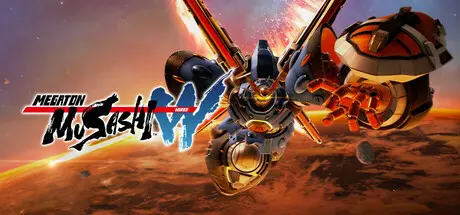
MEGATON MUSASHI W: WIRED Free Download (v3.2.3 + ALL DLC + Online)
Featured Replies

header.webp

Game Details

Release Name:ย MEGATON MUSASHI W: WIRED

Game Version:ย v3.2.3 | Build 16808447

Release Date: 24 Apr, 2024

Publisher: LEVEL5 Inc.

Developer: LEVEL5 Inc.

Based On:ย CSF & Goldberg

MEGATON MUSASHI W: WIRED Direct Download - Game Review

Customize the parts and weapons of giant robot Rogues
to take back the Earth from alien invaders in this mecha
action RPG. Defeat enemies with flashy and exhilarating attacks!

โ–  Engage in exciting robot battles while being immersed in a thrilling story!
As Earth faces invasion by an alien force, a number of young people are chosen to pilot giant robots called Rogues to take back their home in this enthralling mecha action RPG.
Customize your Rogue to make it your own, master flashy attacks in the midst of battle, and enjoy an intricate tale full of rich characters.

โ–  Hack and slash through missions to obtain legendary items!
Eliminate your enemies with invigorating attacks to clear missions! Win battles and obtain parts to upgrade your Rogue! Collect rare items including custom parts, weapons, and power-up materials! Find legendary items to assemble the ultimate mecha!

โ–  Fight alongside your friends to defeat powerful enemies, or take them on in head-to-head battles!
Up to three players can either play cooperatively or participate in fiery versus battles against other teams of up to three online!

โ–  Collab mechs join the action!
The classic super robots, Mazinger Z, Getter Robo, Combattler V, and Voltes V join Megaton Musashi in an epic collaboration! Both the mecha and their weapons are ready for battle! Collect all of the parts to assemble your own personalized battle machine!


Game Screenshots

screenshot screenshot screenshot screenshot


Game Trailer


System Requirements

Minimum Requirements

Recommended Requirements

OS

Windows 10 64bit

Windows 10 64bit Windows 11 64bit

Processor

Intel Core i3-3225 / AMD A10-7850K

Intel Core i7-4770K / AMD Ryzen 5 1600

Memory

8 GB RAM

8 GB RAM

Graphics

GeForce GTX 650Ti / Radeon R7 370

NVIDIA GeForce GTX 1060 / Radeon RX570

DirectX

Version 11

Version 11

Storage

45 GB available space

45 GB available space


Installation Guide

  1. No Installation Needed: The game is pre-installed. Just download and extract.

  2. Extract: Right-click the .zip or .rar file and select "Extract Here" or "Extract to folder".

  3. Run: Find MEGATON MUSASHI W.exe inside the folder and run it.

Multiplayer & Online (Optional)

  • Play Online: Download the Online Fix file and apply it to the game folder.

  • Please go to the online fix page and read the guide.

Game Data & Settings

  • Change Language: Edit the file located at steam_settings/Configs.user.ini

Important Notes

DLC List

Added DLCs

MEGATON MUSASHI W: WIRED - Victory Pose "Mystery"

MEGATON MUSASHI W: WIRED - Victory Pose "Hoodlum"

MEGATON MUSASHI W: WIRED - Victory Pose "Squad Pose"

MEGATON MUSASHI W: WIRED - Victory Pose "Robot Dance"

MEGATON MUSASHI W: WIRED - Victory Pose "Boxing"

MEGATON MUSASHI W: WIRED - Victory Pose "Karate"

MEGATON MUSASHI W: WIRED - Victory Pose "Drums"

MEGATON MUSASHI W: WIRED - Victory Pose "Bodybuilder"

MEGATON MUSASHI W: WIRED - Victory Pose "Fist Pump"

MEGATON MUSASHI W: WIRED - Victory Pose "Hero"

MEGATON MUSASHI W: WIRED - Victory Pose "Badass"

MEGATON MUSASHI W: WIRED - Victory Pose "Kabuki"

MEGATON MUSASHI W: WIRED - Rogue "Cybane (Tamahagane Silver)"

MEGATON MUSASHI W: WIRED - Rogue "Bloody Zelle"

MEGATON MUSASHI W: WIRED - Rogue "Brahms Knight (Night Black)"

MEGATON MUSASHI W: WIRED - Rogue "Mad Bison (Demon Bordeaux)"

MEGATON MUSASHI W: WIRED - Rogue "Kaiser (Castle Snow)"

MEGATON MUSASHI W: WIRED - Rogue "Arthur Riser (Dragon Green)"

MEGATON MUSASHI W: WIRED - Rogue "Sparkman Wave (Zeus White)"

MEGATON MUSASHI W: WIRED - Rogue "Musashi (Samurai Red)"

MEGATON MUSASHI W: WIRED - Attire "Arshem (Captain's Uniform)"

MEGATON MUSASHI W: WIRED - Attire "Arshem (Dress)"

MEGATON MUSASHI W: WIRED - Attire "Arshem (Yukata)"

MEGATON MUSASHI W: WIRED - Attire "Momoka (Yukata)"

MEGATON MUSASHI W: WIRED - Attire "Victor (Yukata)"

MEGATON MUSASHI W: WIRED - Attire "Yamato (Yukata)"

MEGATON MUSASHI W: WIRED - Attire "Masamune (Casual)"

MEGATON MUSASHI W: WIRED - Attire "Yamato (Student Uniform)"

MEGATON MUSASHI W: WIRED - Fashionable Pack Vol. 4

MEGATON MUSASHI W: WIRED - Fashionable Pack Vol. 3

MEGATON MUSASHI W: WIRED - Fashionable Pack Vol. 2

MEGATON MUSASHI W: WIRED - Fashionable Pack Vol. 1

MEGATON MUSASHI W: WIRED - Riding Board Effect Set 2

MEGATON MUSASHI W: WIRED - Riding Board Effect Set 1

MEGATON MUSASHI W: WIRED - Riding Board Color Set

MEGATON MUSASHI W: WIRED - V Navigator "Dragon"

MEGATON MUSASHI W: WIRED - V Navigator "Jibanyan"

MEGATON MUSASHI W: WIRED - V Navigator "Korone Inugami"

MEGATON MUSASHI W: WIRED - Edition Upgrade (Deluxe)

๐Ÿ”ฅDOWNLOAD AREA๐Ÿ”ฅ

๐Ÿ”น43.06 GB๐Ÿ”น

Select the server you want to download with ZeiLink.

Download

Online Fix - (RAR pass: rexagames.com)

  • Views 843
  • Created
  • Last Reply

Posted Images

Create an account or sign in to comment

Recently Browsing 0

  • No registered users viewing this page.

Account

Navigation

Search

Search

๐Ÿ”Ž Search Tip
For exact results, search using "game name" .
Without quotes, results may include unrelated titles.

Configure browser push notifications

Chrome (Android)
  1. Tap the lock icon next to the address bar.
  2. Tap Permissions โ†’ Notifications.
  3. Adjust your preference.
Chrome (Desktop)
  1. Click the padlock icon in the address bar.
  2. Select Site settings.
  3. Find Notifications and adjust your preference.
