



Skip to content
View in the app

A better way to browse. Learn more.

ZeiGames

A full-screen app on your home screen with push notifications, badges and more.

To install this app on iOS and iPadOS
  1. Tap the Share icon in Safari
  2. Scroll the menu and tap Add to Home Screen.
  3. Tap Add in the top-right corner.
To install this app on Android
  1. Tap the 3-dot menu (โ‹ฎ) in the top-right corner of the browser.
  2. Tap Add to Home screen or Install app.
  3. Confirm by tapping Install.

BlazBlue: Cross Tag Battle Free Download (Build 9302017 + ALL DLC)
Featured Replies

header.webp

Game Details

Release Name:ย BlazBlue: Cross Tag Battle

Game Version: Build 9302017

Release Date: 20 Nov, 2019

Publisher: Arc System Works

Developer: Arc System Works

Based On:ย CSF & Goldberg

BlazBlue: Cross Tag Battle Direct Download - Game Review

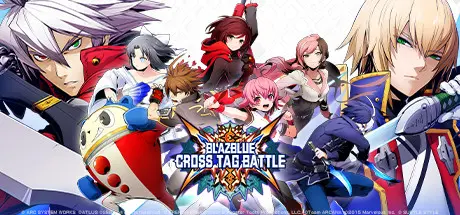
An unrivaled clash of explosive proportions! The beloved BlazBlue franchise Crosses universes, Tags in fan favorites, and Battles it out in BlazBlue: Cross Tag Battle! Created through an all-star collaboration between BlazBlue, Atlusโ€™ Persona, French Breadโ€™s Under Night In-Birth, and Rooster Teethโ€™s hugely popular RWBY web series, Cross Tag Battle celebrates the fighting genre for pros and newcomers alike! Choose your team in fast paced 2v2 team battles filled with the craziness youโ€™ve come to love from BlazBlue, with all the tight mechanics, smooth gameplay, and gorgeous 2D graphics you expect from Arc System Works.

BlazBlue, celebrating 10 years of fighting game excellence in 2018, is a series long beloved by the fighting game community for its deep and engrossing story, its vast cast of balanced characters, and its quick and kinetic gameplay style.
Atlusโ€™ Persona series, a worldwide RPG phenomenon and no stranger to the fighting game genre itself. Persona characters have appeared in Arc System Works games before, notable Persona 4 Arena and Persona 4 Arena Ultimax.
Under Night In-Birth is veteran fighting game developer French Breadโ€™s first foray into an original title, coming hot off the heels of their success with the cult classic series Melty Blood.
Rooster Teethโ€™s animated mega hit, RWBY, has been a popular franchise for years, crossing both gender and age barriers to become a mainstream hit. Characters from the RWBY series have never appeared in a fighting game before. Until now.


Game Screenshots

screenshot screenshot screenshot screenshot


Game Trailer


System Requirements

Minimum Requirements

Recommended Requirements

OS

Windows 8 / 8.1 / 10

-

Processor

Intel Core i5 / i7

-

Memory

4 GB RAM

-

Graphics

GeForce GTX 650 / Radeon R7 250 or better

-

DirectX

Version 9.0c

-

Storage

28 GB available space

-


Installation Guide

  1. No Installation Needed: The game is pre-installed. Just download and extract.

  2. Extract: Right-click the .zip or .rar file and select "Extract Here" or "Extract to folder".

  3. Run: Find BBTAG.exe inside the folder and run it.

Game Data & Settings

  • Change Language: Edit the file located at steam_settings/Configs.user.ini

  • Save Data Location: */Save

Important Notes

DLC List

Added DLCs

BlazBlue Cross Tag Battle Ver 2.0 Expansion Pack

BBTAG DLC Character Pack Vol.7 - Heart/NaotoKurogane/Teddie/Seth

BBTAG DLC Color Pack 3

BBTAG DLC Color Pack 2

BBTAG DLC Color Pack 1

BBTAG Early Purchase Bonus

BBTAG DLC Character Pack Vol.6 - Nine/Labrys/Mika

BBTAG DLC Character Pack Vol.5 - Mai/Akihiko/Yuzuriha

BBTAG DLC Character Pack Vol.4 - Izayoi/Mitsuru/Merkava

BBTAG DLC Character Pack Vol.3 - Hakumen/NaotoShirogane/Vatista

BBTAG DLC Character Pack Vol.2 - Jubei/Aegis/Carmine

BBTAG DLC Character Pack Vol.1 - Platinum/Kanji/Orie

BBTAG DLC Character - Yang

BBTAG DLC Character - Blake

๐Ÿ”ฅDOWNLOAD AREA๐Ÿ”ฅ

๐Ÿ”น19.67 GB๐Ÿ”น

Select the server you want to download with ZeiLink.

Download

  • Views 446
  • Created
  • Last Reply

Posted Images

Create an account or sign in to comment

Recently Browsing 0

  • No registered users viewing this page.

Account

Navigation

Search

Search

๐Ÿ”Ž Search Tip
For exact results, search using "game name" .
Without quotes, results may include unrelated titles.

Configure browser push notifications

Chrome (Android)
  1. Tap the lock icon next to the address bar.
  2. Tap Permissions โ†’ Notifications.
  3. Adjust your preference.
Chrome (Desktop)
  1. Click the padlock icon in the address bar.
  2. Select Site settings.
  3. Find Notifications and adjust your preference.
